
Instructions
How to import word sets
By following these simple steps, you can easily import word lists from a text file.
brave
careful
famous
happy
interesting
lucky
favored
young
1. First, create a new text file. Then make a list of words. Each new word must be written on a new line.
braveTabvaliente
carefulTabcuidadoso
famousTabfamoso
happyTabcontento
interestingTabinteresante
luckyTabafortunado
favoredTabfavorecido
youngTabjoven
2. You can add your own translation by adding it to the same line after the word, separated by a tab.
Example file
| word | translation | transcription | pos | synonyms | example1 | … |
|---|---|---|---|---|---|---|
| the|apple | яблоко | /ˈæp.əl/ | noun | fruit,pip | She bought… | … |
| to|run | бежать | /rʌn/ | verb | sprint,dash | He runs… | … |
| happy | счастливый | /ˈhæp.i/ | adj | glad,joyful | She felt… | … |
You can also use CSV format with a header row to import additional card fields at once.
Available columns: word (required; may include an article, e.g. the|apple), translation, transcription, pos (part of speech), synonyms (comma-separated), example1 & example1_translation — up to 9 example pairs.
Only the "word" column is required. If a field is left empty, the app will try to fill it from the built-in dictionary.
Example CSV file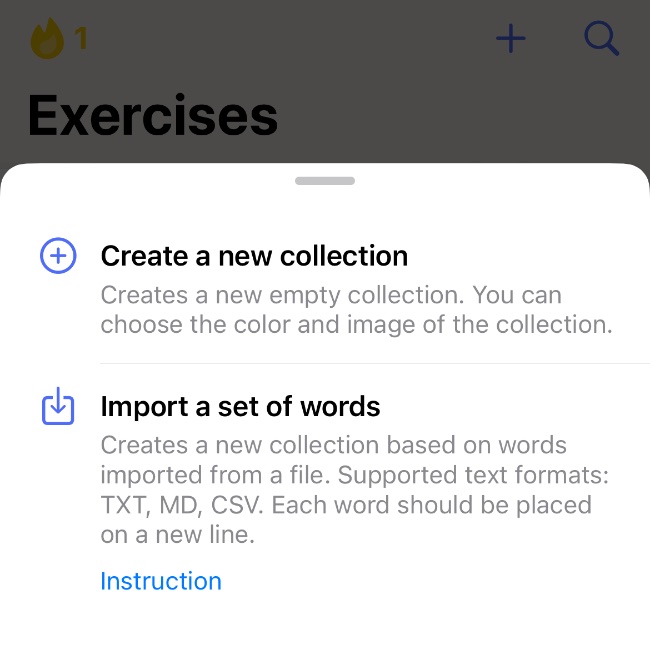
3. Go to the "Learn" section in the app and tap (+) on the top bar.
In the drop-down list, choose "Import word set". The file manager will open. Then select the file you created earlier. A new collection will be created using the file name.